Duxbury Braille Translator
Why Update? One major reason is that DBT 11.1 SR4 can read Word 2010 files.
DBT 11.1 handles tabular format, Excel files, and can deal with many more languages.
Quick links:
- News Flash: Introducing DBT 11.1 SR4
- What does DBT 11.1 SR4 look like?
- What does DBT Win do?
- Who uses DBT Win?
- Notable Features
- System Requirements for DBT Win
- Support
- Download Now
Introducing
DBT 11.1sr4
2012-04-23 (2012-04-24)
DBT 11.1 SR4 is primarily a maintenance release.
This fixes an issue that created problems while editing documents for a small number of users.
We now add support for A4 paper for the Index Basic-D V4 embosser.
| We now support contracted braille for Croatian. |
DBT 11.1sr3
2011-12-23 (2011-12-23)
This service release addresses the following issues:
Languages and Braille:
| Afrikaans braille to print now supported (Afrikaans print to braille has been supported for years). | |
| Armenian (Eastern and Western) print-to-braille translations have been refined. | |
| Czech print to braille has fixes for some of the accented letters. | |
| Mathematics braille translation for British math is improved. | |
| English has improved handling of quotation marks. | |
| German print to braille has fixes for several contractions. | |
| Icelandic has better handling of emphasis. | |
| The print-to-braille and the braille-to-print translations for the languages of India have been improved and have been made more consistent. | |
| Punctuation and numbers are handled better in the Korean translator. The Korean braille to print translator has been substantially improved. | |
| Portuguese now supports hyphenation. | |
| Russian (and other Cyrillic languages) have revised logic for punctuation within numbers. | |
| Swedish now handles hard spaces. | |
| Extensive improvements in Filipino/Tagalog braille to print. | |
| Tigrinya (a major language of Ethiopia) is now supported. |
Newly Added Embossers and Embosser Support:
- Index V4 Embossers
- Enabling Technology Phoenix Embosser
- Index Braille Box Embosser
- Braillo 300 Embosser
- Braillo 650 S&F Embosser
- Braillo graphics for Braillo 200 and Braillo 300 (Limited Support)
Other Notable Features and Fixes of SR3:
- New version of SWIFT works with 64-bit builds of MS Word 2010.
- Improved imports of Word docx format files, including proper handling for print page breaks.
- Insertion of GOODFEEL music files, a feature which had stopped working as of version 11.1, has been restored.
- Improvements to the new DBT 11.1 table handling functions including files that consist solely of very large tables.
- Greater overall program stability, especially in table processing.
- Expanded support of HTML exports: varieties of emphasis, additional characters, and support for tabular material.
- Support for a new file format created by MegaDots 2.5. This allows importing Braille Word files using the BANA/2010 template.
DBT 11.1sr2 / 2011-5-03 (2011-5-04)
This is primarily a maintenance release, but addresses the following issues:
![]() |
The DBT table formatter now handles tabular input from Scientific Notebook and Infty Reader. |
| Reliability improvements while switching between print and braille views of tabular material. | |
| Arabic braille-to-print now supports contracted braille. | |
| Mathematics braille translation improvements for British, American, and UEB math. | |
| Dzongkha table now includes the 2010 Code Revision. | |
| Tamil table has minor improvements. | |
| Armenian (Eastern and Western) print-to-braille translations have more improvements. | |
![]() |
JAWS scripts have stability and usability improvements: the translated line voice has been set to be a bit slower than the normal reading voice. |
| Nippon Telesoft "Super Gemini" embosser is supported. This unit embosses braille and prints inkprint for many languages. | |
| The DBT Installer improves the migration of embosser definitions "for all users" from previous DBT versions for Windows operating systems with user account controls (Vista, Windows 7, or Windows 8). |
DBT 11.1sr1 / 2011-3-2 (2011-3-4)
This is primarily a maintenance release, but addresses the following issues:
- Some systems where Authorization could fail has been resolved. It should now be possible for existing licensed users to trial 11.1 for 45 days.
- An obscure hyperlink issue affecting Word 2007 and 2010 imports has been resolved.
- Additional UK/BAUK braille math matters using Word and MathType have been resolved. UK/BAUK math users are advised to upgrade to this version. Please also note that all our testing has been done using the latest version 6.7a of MathType, and users are advised to upgrade where possible.
- A number of changes have also been made to some of the non-English language translation tables to resolve issues reported from users. May we take this opportunity to sincerely thank you for your feedback.
- Window-Eyes screen reader users should look out for an announcement from GW Micro regarding enhanced access to DBT 11.1 (SR1)
- Support for the yet to be released Cosmo braille embosser is included.
- A new File, Save As" choice has been added: HTML. You can open this HTML file in Microsoft Word. This new "Save As" choice is useful for exporting a file that does not use the Roman alphabet.
DBT 11.1 / 2011-1-7 (2011-1-18)
Here is a list of what's new since DBT 10.7 SR1:
- Imports MS Word 2007 and 2010; MS Excel 2007 and 2010 files
- Imports Open Office Writer & Open Office Calc files
- Now supports over 130 languages for braille translation
- Table
importer & Braille tabular material formatter:
- Imports tables and offers multiple braille table styles including automatic selection of the optimal style
- Allows easy change between table styles
- Supports differences in table formatting for different braille codes
- Improves Math support in many ways: better importer, better translation, now supporting spatial layout for matrixes
- Lets the user select one math translator for all file imports (use Nemeth with Hindi or British Math with Nigerian languages, etc.)
- Allows Switching Braille Tables inside of a document to combine multiple braille systems in a single document.
- Improves functionality for DAISY & NIMAS and other XML document files.
- Now provides back translation (braille to print) as well as print to braille for most braille translators
- Includes New Learning Tables to assist & support approved braille teaching courses: 2 for BANA, 3 for BAUK/UKAAF and 2 for UEB. NOW listed in DOCUMENT menu.
- Offers a low cost print & braille solution – The TranSend SE: Software version of TranSend is available for licensing from Enabling Technologies
- Organizes Translation tables by region
- Refines and updates over a dozen translation tables
- Features New Translation Help
- Adds support for new embossers including the NEW COSMO.
- Improves handling of many current embossers
- Strengthens support for JAWS screen reader
Click here for the full list of changes
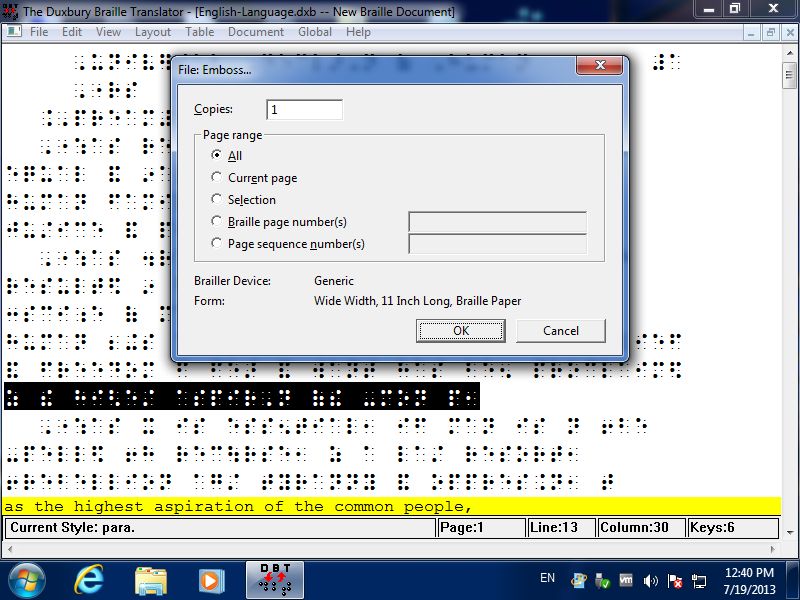
What does our software for braille look like?
Whether you are blind or sighted, our software comes up as a standard modern application, fully accessible AND fully in tune with the latest advances in operating systems and sister applications.
What does software for braille do?
Most people understand the basics about braille: that it provides a reading medium for blind people, using "cells" made up of raised dots in various patterns instead of the characters used in regular print. But many people do not realize that the cells-for-characters substitutions are not, typically, on a one-for-one basis. The process is especially complicated in languages such as English and French where "grade 2" braille is used, involving "contractions" that are based in part upon pronunciation. Formatting of braille pages also involves issues beyond those affecting print. DBT provides translation and formatting facilities to automate the process of conversion from regular print to braille (and vice versa), and also provides word-processing facilities for working directly in the braille as well as the print. "Fonts" are used for displaying the braille.
Who uses software for braille?
Our software is designed for two types--those who don't know braille and those who do. Even if all the braille you know was learned from the previous paragraph, the Duxbury Braille Translator (DBT) will allow you to create highly accurate braille for school books and teaching materials, office memos, bus schedules, personal letters, signs compliant with the Americans with Disabilities Act (ADA) and more. Where you need to be sure of "perfection," we would certainly recommend that you also make use of proofreading (just as you would proofread print books) by a knowledgeable braillist--who may be using DBT as well. That is because DBT is just as important to professional transcribers--for swift conversion to braille from a wide variety of print sources.
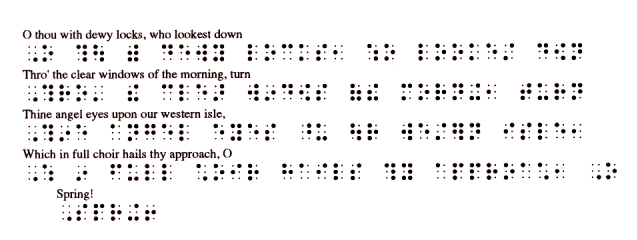
Interline Printing
Notable Features of DBT
DBT is simple to use--beginners learn in just minutes. Yet its depth, power and accuracy are such that it is used by most of the major braille production centers throughout the world. The current version provides the following features:
- Built-in interline printing (see sample above) to have ink-braille and print together. This makes an easy proofing and teaching tool. Great for the braille-impaired too!
- Math/Science Code and Computer Braille translation for American, British, and French Braille.
- Intermediate levels (between grade 1 and 2) for American and British braille
- The ability to include tactile graphics files for mixed text-and-graphic documents
- Imports from popular word processors including Microsoft Word and WordPerfect, HTML, ICADD, DAISY/NISO/NIMAS, formatted and plain ASCII, earlier braille editors such as EDGAR and Polkadot, Duxbury's own historical file formats, and more.
- The current translation table menu includes dozens of major languages plus variations, including grade 2 support for most jurisdictions where grade 2 is customarily used. Moreover, DBT allows languages other than the principal language to be embedded in the same file and treated as appropriate for the context. (Contact us if you have questions about a specific language.) Now braille for foreign-language texts and language teaching texts is a snap.
- Bidirectional (print-to-braille and braille-to-print) translation
- American textbook layout according to Braille Authority of North America (BANA) standards, and likewise the Braille Authority of the United Kingdom (BAUK) customs for the same purpose
- Accurate presentation of both print or braille in either WYSIWYG (what-you-see-is-what-you-get) or coded (how-you-get-what-you-want) views in the word-processing screen, with easy switching between views
- A "translated line" showing the "other" form in either print or braille files
- Six-key chording for braille and print entry, not timing-based, compatible with most keyboards
- Help screens throughout the program
- Over 100 formatting & translation codes for a high level of flexibility
- A library of user-configurable styles
- A user-extendable template library for even more flexibility
- A spell-checker with 300,000-word dictionary
- A "Quick Find Misspelling" feature for increased speed and ease of use
- Embossing to all major braille printers; the first page may be a "banner" for job identification by personnel who don't read braille
- The Duxbury Braille Font for viewing braille dots within other programs
- Choice of single-user, site & other licenses
- Unlimited technical support by telephone, email, fax, etc.
- An Internet user forum to communicate with other Duxbury users
- All backed by a 90-day satisfaction guarantee!
Systems Requirements for DBT Win
DBT requires 100 megabyes of hard drive space after installation is complete; DBT requires Microsoft Windows version 2000, XP, Vista, Windows 7, or Windows 8.
Release History DBT Win | Purchase | Updates | Demo | Complete Price List
Our new Video:
Copyright Duxbury Systems, Inc. Thursday, February 07, 2013



