Duxbury Braille Translator (Windows and Mac)
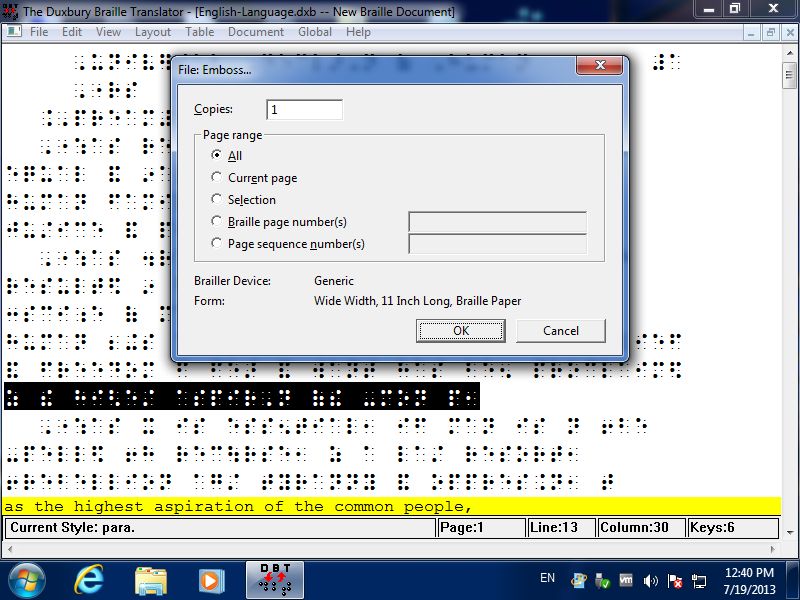
What does our software for braille look like?
Whether you are blind or sighted, our software comes up as a standard modern
application, fully accessible AND fully in tune with the latest advances in
operating systems and sister applications.
What does software for braille do?
Most people understand the basics about braille: that it provides a reading
medium for blind people, using "cells" made up of raised dots in
various patterns instead of the characters used in regular print.
But many people do not realize that the cells-for-characters
substitutions are not, typically, on a one-for-one basis. The
process is especially complicated in languages such as English and
French where "grade 2" braille is used, involving "contractions" that
are based in part upon pronunciation. Formatting of braille pages
also involves issues beyond those affecting print. DBT provides
translation and formatting
facilities to automate the process of conversion from regular print
to braille (and vice versa), and also provides
word-processing facilities for working directly in
the braille as well as the print. "Fonts" are used for displaying
the braille.
Who uses software for braille?
Our software is designed for two types--those who don't know
braille and those who do. Even if all the braille you know was learned from
the previous paragraph, the Duxbury Braille Translator (DBT) will allow you
to create highly accurate braille for school books and teaching materials, office
memos, bus schedules, personal letters, signs and more. Where you need to be sure of "perfection,"
we would certainly recommend that you also make use of proofreading (just as
you would proofread print books) by a knowledgeable braillist--who may be using
DBT as well. That is because DBT is just as important to professional transcribers--for
swift conversion to braille from a wide variety of print sources.
Interline Printing
Notable Features of DBT
DBT is simple to use--beginners learn in just minutes. Yet its depth, power and accuracy are such that
it is used by most of the major braille production centers throughout the world.
The current version provides the following features:
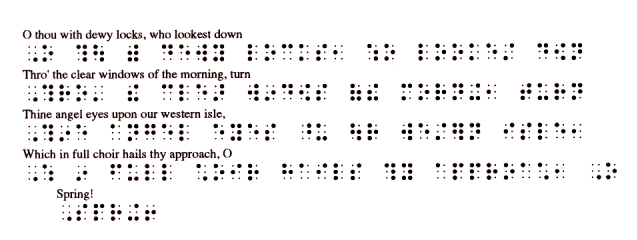
- Built-in interline printing (see sample above) to have ink-braille and print together.
This makes an easy proofing and teaching tool. Great for the braille-impaired too!
- Math/Science Code and Computer Braille translation for American, UEB, British, and French Braille.
- Intermediate levels (between grade 1 and 2) for American and British braille
- The ability to include tactile graphics files for mixed text-and-graphic documents
- Duxbury DBT can import files from the GOODFEEL Music Translation
program from Dancing Dots.
- The current translation table menu includes over 180 different
languages plus variations, including contracted braille for most jurisdictions
where contracted braille is customarily used.
- Duxbury DBT Win 15.1 SR1 fully supports UEB (Unified English Braille) for
United States.
- Duxbury DBT can import Microsoft Word 2003/2007/2010/2013/2016/2019/2021/365 files, as well as Open Office files.
- DBT allows languages other than the principal language to be embedded in the same file and treated as appropriate
for the context. (Contact us if you have questions about a specific language.)
Now braille for foreign-language texts and language teaching texts is a snap.
- Bidirectional (print-to-braille and braille-to-print) translation for most languages.
- Accurate presentation of both print or braille in either WYSIWYG (what-you-see-is-what-you-get)
or coded (how-you-get-what-you-want) views in the word-processing screen,
with easy switching between views
- A "translated line" showing the "other" form in either print or braille files
- Six-key chording for braille and print entry, not timing-based, compatible with most keyboards
- Help screens throughout the program
- Over 100 formatting & translation codes for a high level of flexibility
- A library of user-configurable styles
- A user-extendable template library for even more flexibility
- A spell-checker with 300,000-word dictionary
- A "Quick Find Misspelling" feature for increased speed and ease of use
- Embossing to all major braille printers; the first page may be a "banner"
for job identification by personnel who don't read braille
- Single-user and Network licenses available.
- Unlimited technical support by telephone, email, fax, etc.
- An Internet user forum to communicate with other Duxbury users
- All backed by a 90-day satisfaction guarantee!
Systems Requirements for DBT Win
DBT Win 15.1 SR1 requires Windows 8, Windows 10, or Windows 11.
Systems Requirements for DBT Mac
To use DBT for Mac, we recommend running Mac OSX El Capitan (10.11), Sierra (10.12), High Sierra (10.13), or higher.